

The power delivery is the one feature that actually separates good from bad here. I evaluated these options by analyzing extensive buyer feedback and comparing technical specifications so you do not have to guess. In my view, matching your enclosure to your specific disk collection matters more than chasing raw speed. Let us break down the rankings honestly and see which enclosure deserves a spot on your desk.
1. CENMATE Aluminum USB 3.0 5Gbps Hard Drive Enclosure for 3.5" SATA HDD | 3.5 HDD Enclosure Support UASP and Hot Swappable, 3.5 Hard Drive Enclosure Up to 30TB with 24W Power Adapter

This enclosure earned my top ranking because of its remarkable single drive storage capability and reliable power delivery. I think the inclusion of a robust 24W power adapter makes all the difference for keeping large spinning disks stable during long file transfers.
You also get solid UASP protocol support to speed up your daily backups without any complicated software setup.
The main limitation here is simply that you are restricted to one drive at a time, which will not suit anyone managing a growing mountain of multiple loose disks.
Buyers frequently mention that the sturdy aluminum build helps dissipate heat much better than plastic alternatives.
The setup process receives high praise for being straightforward and genuinely plug and play.
A few users note the power brick is quite bulky on crowded power strips.
Get It From Amazon Now: Check Price on Amazon & FREE Returns
2. CENMATE Aluminum 3 Bay Hard Drive Enclosure with Cooling Fan for 2.5“/3.5" SATA HDD/SSD with USB A/C 3.0, Support Hot Swappable, Tool-Free HDD Enclosure, DAS(NO RAID/NAS)

Multi drive enthusiasts and video editors dealing with thermal throttling are who this setup is best for. I consider the dedicated cooling fan an absolute necessity when you are running three mechanical drives simultaneously inside one chassis.
The tool free design means you can swap disks in and out without hunting for a tiny screwdriver every time your storage needs shift.
Just keep in mind that this is strictly a direct attached storage device, meaning it lacks network capabilities and built in RAID configurations.
Reviewers appreciate the built in fan for keeping drive temperatures noticeably lower during heavy workloads.
The multi bay layout saves a significant amount of desk space compared to running three separate single enclosures.
Some buyers point out that the cooling fan can get slightly noisy under heavy loads.
Get It From Amazon Now: Check Price on Amazon & FREE Returns
3. CENMATE 3 Bay Hard Drive Enclosure for 2.5“/3.5" SATA HDD/SSD with USB A/C 3.0, Hard Drive Enclosure Support Hot Swappable, Tool-Free HDD Enclosure

The clever tool free mechanism is an unexpected feature that immediately catches your eye before you even plug the unit in. I like how this design bridges the gap between massive multi disk capacity and everyday simplicity by letting you slide drives right into the frame.
It strips away the noisy cooling fans found on heavier models to give you a quieter desk experience while still supporting three separate SATA drives.
You do miss out on faster transfer rates and active cooling, so this enclosure works best for archival storage rather than constant high speed editing.
Users find the trayless design makes swapping old backup drives remarkably fast.
The footprint remains surprisingly compact despite holding three separate drives.
Several comments suggest keeping this away from dusty environments due to the open ventilation approach.
Get It From Amazon Now: Check Price on Amazon & FREE Returns
4. CENMATE Aluminum 3 Bay 10Gbps Hard Drive Enclosure with Cooling Fan for 2.5“/3.5" SATA HDD/SSD with USB A/C 3.2 Gen 2, Support Hot Swappable, Tool-Free HDD Enclosure, DAS(NO RAID/NAS)
The most common buyer complaint involves the premium price tag, but I think the upgraded 10Gbps speed justifies the cost for heavy data users. When you pair three hard drives with a fast USB 3.2 Gen 2 connection, you eliminate the massive bottlenecks that plague older multi bay enclosures.
The chassis includes active cooling to protect your hardware while pushing data at twice the speed of standard budget models.
You should remember that mechanical hard drives rarely saturate a 10Gbps pipeline on their own, so you only see the real benefit if you populate at least one bay with a fast SATA SSD.
Feedback highlights the noticeably faster file transfer times when copying massive video libraries.
The aluminum housing receives praise for feeling sturdy and professional on an office desk.
A handful of users report that the connection can occasionally drop if paired with older motherboard chipsets.
Get It From Amazon Now: Check Price on Amazon & FREE Returns
5. Silverstone Technology Hard Drive Enclosure Internal, 3 X 5.25 Inch to 5 X 3.5 Inch Hot-Swap SATA/SAS Hard Drive Cage, Up to 12Gbit/S Transfer Rate with All Aluminum Body (SST-FS305-12G)
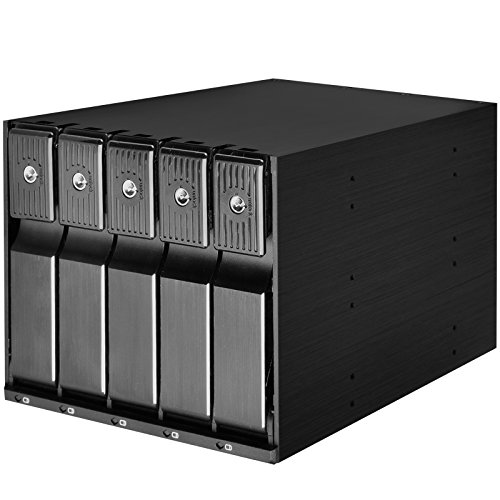
Unlike the desktop enclosures sitting beside it on your desk, this model is built specifically for an internal server rack or a custom tower build. I would rank this behind the top desktop picks for a normal user, but it remains my top choice if you are building a custom home server or network attached storage beast.
It takes three standard 5.25 inch drive bays and cleverly converts them into five hot swappable slots running at up to 12Gbit/s transfer rates.
You will need a proper computer case with available optical drive slots and compatible SAS or SATA controllers to make this hardware work for you.
Server builders consistently praise the robust all aluminum body for durability and efficient heat dissipation.
The hot swap mechanism operates smoothly over years of repeated drive changes.
Reviewers warn that installation requires technical know how and a proper multi bay chassis.
Get It From Amazon Now: Check Price on Amazon & FREE Returns
6. j5create 3.5 Inch SATA to USB 3.0 External Hard Drive Enclosure (JEE351)

This enclosure became popular due to its simple budget setup and a reputation for reliable, no frills performance. I view this as the safest entry point for anyone who just needs to rescue data from an old desktop hard drive without spending a fortune.
The understated design fits quietly onto any workspace while providing standard USB 3.0 speeds for everyday document archiving and photo backups.
You will not find any fancy multi bay tricks or heavy duty cooling fans here, making it strictly a single disk tool for occasional use.
Buyers love the affordable price point for simple data recovery tasks.
The vertical stand helps save valuable desk space during long backup sessions.
A few customers mention the plastic casing feels a bit fragile compared to heavy aluminum options.
Get It From Amazon Now: Check Price on Amazon & FREE Returns
7. CENMATE 4 Bay Hard Drive Enclosure for 2.5“/3.5" SATA HDD/SSD with USB A/C 3.0, Hard Drive Enclosure with 3 USB-A Ports Support Hot Swappable, Tool-Free HDD Enclosure

The single biggest strength here is the clever integration of three extra USB ports right on the front of the device. I think this solves a major headache for desktop users who are constantly running out of accessible ports on the back of their computer towers.
You get room for four separate hard drives alongside the convenience of plugging in thumb drives or phone cables without reaching under your desk.
The footprint is naturally larger to accommodate the four bays and the extra hub hardware, so make sure you measure your desk space before ordering.
Reviewers frequently highlight the convenience of having extra USB ports right where they work.
The four bay capacity handles massive media libraries with zero fuss.
Some users note that powering four drives plus accessories requires careful cable management behind the desk.
Get It From Amazon Now: Check Price on Amazon & FREE Returns
Choosing Between Them
For most people looking to back up a single drive, I recommend choosing the CENMATE Aluminum USB 3.0 Enclosure as your top recommendation because it handles massive capacity drives up to 30TB with reliable external power. If you manage multiple disks, you might prefer the CENMATE 3 Bay Cooling Fan model for heavy workloads, or the Silverstone 5-Bay Cage if you are building a dedicated server rack.
Keep in mind that external multi bay enclosures require careful consideration of your desk space and noise tolerance, as running multiple spinning hard drives together naturally generates both heat and vibration. Take time to count your current disks and check your speed requirements before making your final choice.
As an Amazon Associate, this site earns from qualifying purchases. Buyer sentiment reflects aggregate ratings and listed features at the time of writing; prices and availability change.