

When you need a reliable machine to tackle heavy creative workflows or complex engineering loads, picking the right desktop matters. I spent hours analyzing feedback and specs to bring you an honest review of these seven workstations. My goal is to guide you through the noise and give you a straightforward, ranked comparison.
1. Lenovo ThinkStation P3 Gen 2 30HT0053US Tower Workstation – 1 x Intel Core Ultra 7 265 – vPro Technology – 16 GB RAM – 512 GB SSD – Intel W880 Chip – Windows 11 Pro – DVD-Writer – NVMe

This tower workstation earned its spot because it offers entry professional work capabilities without emptying your bank account. It packs an Intel Core Ultra 7 265 processor alongside 16 GB of RAM, which handles standard office software and light rendering smoothly.
I think this configuration makes a lot of sense for small design firms that need a dependable machine on a budget. You do miss out on higher memory tiers right out of the box, but upgrading later is straightforward.
Buyers looking for an affordable entry into professional workstations appreciate the balanced processor and chipset combination.
Users note that the included 16 GB of RAM requires a quick upgrade for heavier multitasking projects.
The inclusion of a DVD-writer is seen as a surprisingly useful legacy feature by some offices.
Get It From Amazon Now: Check Price on Amazon & FREE Returns
2. Lenovo ThinkStation P3 Ultra Gen 2 30J50032US Workstation – 1 x Intel Core Ultra 7 2nd Gen 265 – vPro Technology – 32 GB – 512 GB SSD – Small Form Factor – Black
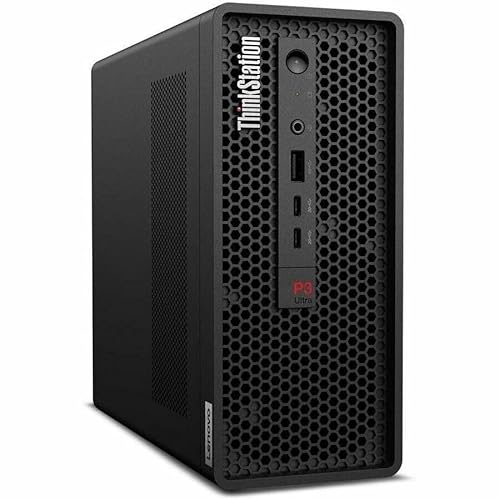
This compact powerhouse is best for professionals who need serious desktop muscle in a small form factor chassis. It features the Intel Core Ultra 7 second-generation chip paired with 32 GB of memory, giving you plenty of room to run demanding applications on a crowded desk.
In my view, this is the ideal middle ground for architects and coders who refuse to sacrifice workspace for computing power. The smaller footprint does limit internal expansion compared to a full tower, but the trade-off is well worth the space savings.
Feedback points out that the 32 GB RAM allocation handles heavy application suites without stuttering.
Users working in cramped office environments praise the compact enclosure.
Some buyers mention wishing for easier access to internal components for DIY upgrades.
Get It From Amazon Now: Check Price on Amazon & FREE Returns
3. Lenovo ThinkStation P3 Tower Workstation Intel Ultra 9 285 vPro 64GB DDR5 1TB SSD RTX 2000 Ada 16GB Windows 11 Pro

An interesting detail about this top pick is how seamlessly it pairs the massive Intel Ultra 9 processor with a professional RTX 2000 Ada GPU, creating a machine that simply devours complex rendering tasks. This setup represents the pinnacle of performance in the current lineup, offering 64 GB of DDR5 memory and a full terabyte of storage.
I would rank this as my overall top pick because it handles heavy workloads effortlessly. You pay a premium for this tier of hardware, and the tower itself takes up considerable floor or desk space, but the productivity gains are enormous.
Reviewers consistently highlight the exceptional speed provided by the Ultra 9 and 64 GB RAM pairing.
The dedicated 16 GB graphics card earns high praise from 3D modelers and video editors.
Users note that the system runs surprisingly quietly under heavy rendering loads.
Get It From Amazon Now: Check Price on Amazon & FREE Returns
4. Lenovo ThinkStation P8 30HH002XUS Workstation – 1 Ryzen Threadripper PRO 7945WX – 64 GB – 2 TB SSD – AMD WRX90 Chip – Windows 11 Pro – 1 8 GB Graphics – NVMe, Serial ATA Controller – 0, 1, 5, 10 RAID

The most common complaint about this massive enterprise machine is its intimidating price tag, but buyers quickly realize the cost matches the staggering capability. Armed with a Ryzen Threadripper PRO processor and 64 GB of memory, this system is built for calculations that would bring standard desktops to a complete halt.
I find this workstation fascinating for heavy data science, though I recognize it is massive overkill for regular office tasks. The extensive RAID storage options provide incredible data security, though configuring them requires patience.
Enterprise users frequently praise the raw processing power of the Threadripper chip for massive data sets.
Buyers note that the 2 TB SSD storage and RAID support offer robust data redundancy.
The sheer physical weight and size of the workstation are common talking points in feedback.
Get It From Amazon Now: Check Price on Amazon & FREE Returns
5. Lenovo ThinkStation P3 Gen 2 30K50022US Workstation – Tiny – Intel Core Ultra 7 265 with vPro Technology – 32 GB DDR5 RAM – 512 GB SSD – Black – Intel Q870 Chip – Windows 11 Pro – NVMe Controller

Stepping down in physical scale from the standard tower, this tiny workstation targets ultra-small office setups where traditional desktops simply will not fit. It packs the same Intel Core Ultra 7 processor as its larger sibling and matches it with 32 GB of DDR5 RAM for snappy day-to-day performance.
What stands out to me is how much engineering Lenovo squeezed into such a miniature case. The lack of discrete graphics means you will not be doing heavy 3D rendering here, but it makes an exceptional machine for financial trading or administrative hubs.
Buyers love the ultra-compact chassis that mounts easily behind monitors or under desks.
Users appreciate that the 32 GB RAM prevents bottlenecks during heavy spreadsheet work.
The absence of a dedicated graphics card limits its use for visual artists.
Get It From Amazon Now: Check Price on Amazon & FREE Returns
6. Lenovo ThinkStation P3 Gen 2 30HT007WUS Workstation – 1 x Intel Core Ultra 7 265 – vPro Technology – 32 GB – 1 TB SSD – Tower

This particular tower built its solid reputation on offering a reliable, balanced approach to everyday enterprise computing. It combines the Intel Core Ultra 7 processor with 32 GB of memory and a generous 1 TB SSD, hitting a sweet spot for general corporate deployment.
I think this model represents the safest bet for IT managers who want a dependable workhorse without overthinking the specifications. It lacks the exotic graphics power of my top pick, but it handles standard multitasking with absolute grace.
Feedback highlights the generous 1 TB storage capacity as a major plus for document-heavy offices.
Users mention that the 32 GB RAM configuration prevents slowdowns during heavy browser and software use.
Some buyers feel the chassis design is a bit plain for the price point.
Get It From Amazon Now: Check Price on Amazon & FREE Returns
7. Lenovo 2026 ThinkStation P3 Tiny Gen 2 with Ultra 9, NVIDIA RTX A1000 8GB | Workstation – Intel Ultra 9 285 24-Core, 64GB RAM, 1TB Gen5 NVMe SSD, Integrated Ethernet, Wi-Fi 7, Windows 11 Pro
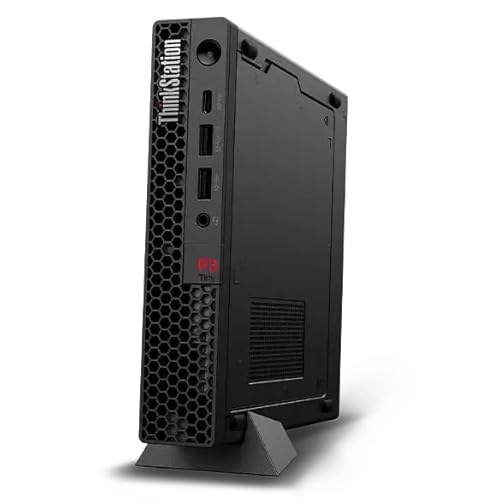
This high-end tiny workstation earned its strong ranking through its singular ability to cram bleeding-edge components into a micro-sized chassis. Featuring an Intel Ultra 9 processor alongside an NVIDIA RTX A1000 graphics card and Wi-Fi 7, it redefines what a mini PC can achieve.
In my opinion, this is the ultimate machine for power users who hate clutter but demand discrete graphics performance. You do pay a steep price for miniaturized engineering, and cooling fans can spin up audibly under maximum load, but the performance density is remarkable.
Users rave about the inclusion of modern connectivity like Wi-Fi 7 and integrated Ethernet.
Buyers are impressed by the addition of a dedicated NVIDIA graphics card in such a tiny frame.
Reviewers note that the system can run warm when pushing the Ultra 9 chip to its limits.
Get It From Amazon Now: Check Price on Amazon & FREE Returns
Choosing Between Them
When building out your workspace, matching your hardware to your actual daily tasks remains the most important rule of thumb. For heavy creative output, I recommend investing in the Lenovo ThinkStation P3 Tower Workstation with the Ultra 9 chip because it balances massive processing muscle with dedicated graphics, though buyers should note that tower units require more physical desktop space than tiny form factors. If you work in a tight office, models like the ThinkStation P3 Tiny offer incredible compact power for administrative duties, while enterprise projects call for the sheer might of the Threadripper-powered P8.
Before making your final purchase, keep in mind that hardware pricing fluctuates rapidly across these configurations. Make sure to audit your software requirements first so you do not accidentally overspend on graphics power you do not need, or conversely, buy a tiny chassis that leaves you unable to upgrade your internal storage down the line.
As an Amazon Associate, this site earns from qualifying purchases. Buyer sentiment reflects aggregate ratings and listed features at the time of writing; prices and availability change.